Most organisations discover the Logitech ConferenceCam Group after an embarrassing incident rather than a planned hardware review. A law firm operating out of DLF Cyber City, eight partners seated around a 20-foot conference table, a client call from Singapore that stalled halfway through because three partners sitting at the far end of the table were functionally invisible to the microphone. The call was rescheduled. The stated reason on the follow-up email: connectivity issues. The actual reason: the room’s audio pickup ended approximately where the seventh chair began.
The Wrong Diagnosis That Ran for Eight Months
Before the hardware conversation started, the firm had tried something else. Two things, actually.
First, they upgraded the building’s fibre plan. Call quality on individual laptops improved noticeably. Conference room audio stayed exactly the same. Then someone suggested the problem was how the team was structured during calls. Everyone needed to sit closer to the centre of the table. For three months, partners quietly rearranged their seating before important client calls. A managing partner who had been with the firm for nineteen years began dialling in separately from his own laptop while sitting in the same room, to ensure his voice would register on the far end.
The diagnosis running the organisation’s response was wrong from the beginning. The problem was never internet bandwidth, seating culture, or individual habits. The problem was a 20-foot room being served by a 6-foot microphone. The hardware had never matched the room. No one had checked.
What the Invisible Invoice Actually Recorded
The cost of that misdiagnosis never appeared on a hardware budget. It appeared as follow-up emails after every major client call: apologies that audio was unclear on the firm’s end during the second half of the meeting. It appeared as rescheduled conversations. It appeared as decisions deferred because a critical voice from the far side of the table had not been heard clearly enough to act on.
In the firm’s records, none of this was labelled conference room hardware failure. It was absorbed into communication overhead, meeting management costs, and once, in an HR note, a reference to participation patterns in leadership calls.
That invisible invoice accumulated for eight months before anyone connected the audio gap to the physical dimensions of the conference room. The diagnosis changed entirely when the question shifted from who was not participating enough to where the microphone stopped working.
A Pattern That Repeats Across Delhi NCR Boardrooms
This is not an isolated case. A consistent observation across corporate buildings in Noida Sector 62, Faridabad, and Okhla tells a familiar story: mid-to-large conference rooms furnished to impress in square footage and display size, equipped with audio and video hardware designed for rooms a third of that scale.
The spend ratio is consistently inverted. A 30-seat boardroom receives a 75-inch display, premium seating, and acoustically treated wall panels. The conference camera and microphone cost a fraction of the display unit, and often the same unit that was already handling the organisation’s smaller meeting room. The room looks serious. It sounds unreliable.
This is not a technology literacy problem. It is a procurement habit rooted in what is visible. Display screens and furniture are visible. Audio coverage radius is not. Organisations budget for what they can see and tolerate what they cannot hear until a client call fails at the wrong moment. That observation holds independent of any hardware decision.
What the Logitech ConferenceCam Group Was Built to Fix
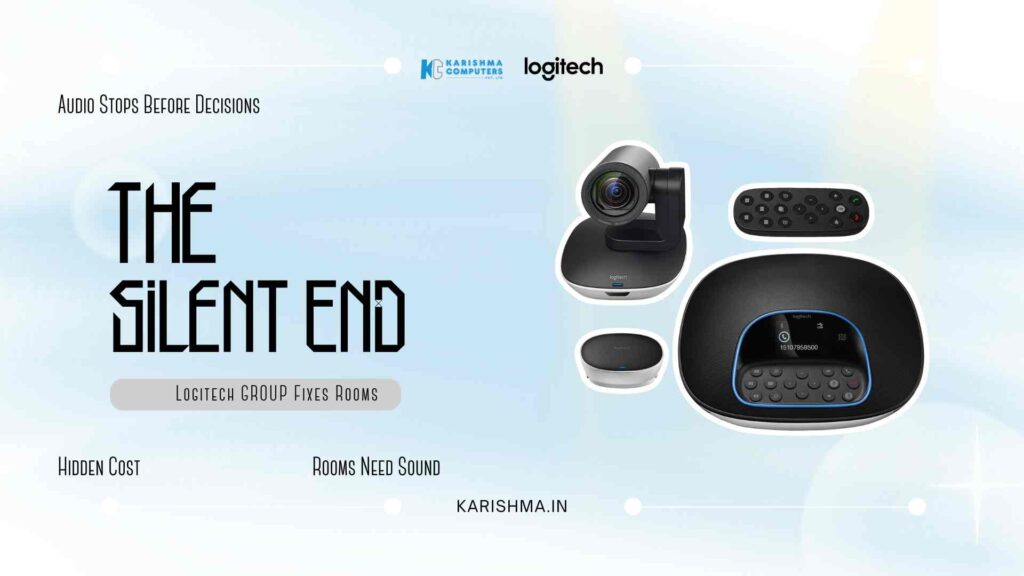
The Logitech ConferenceCam Group was designed specifically for conference rooms seating 8 to 14 people, the room size that sits between huddle-room setups and full enterprise AV installations. The hardware separates camera and speakerphone as independent units, each optimised for different physical challenges in a large room.
The camera delivers Full HD 1080p video with a 90-degree field of view, 260-degree pan, 130-degree tilt, and 10x zoom. In rooms where participants sit along one side of a long table or in a horseshoe configuration, the camera can cover the room without requiring a dedicated operator. Auto-focus holds across the full zoom range, and one-touch preset controls allow rooms to operate without specialist AV support on-site.
The speakerphone delivers 360-degree audio coverage with a pickup radius of 6 metres, handling rooms where participants are seated up to 20 feet from the device. Full-duplex audio ensures conversation flows in both directions without voice dropout when participants at both ends speak simultaneously. Beamforming microphone technology focuses on human voice frequencies while reducing HVAC background noise, a consistent challenge in Delhi NCR office buildings where central air systems create a persistent low-frequency hum that standard microphones amplify rather than filter.
How the Logitech ConferenceCam Group Scales Without Added Complexity
For rooms that extend beyond 14 seats, the Logitech ConferenceCam Group supports an expansion microphone that daisy-chains to extend audio coverage without requiring separate infrastructure. A room configured for 20 participants can operate with consistent audio pickup across the full table length, without asking anyone to reposition or raise their voice.
This scalability addresses a specific operational reality in Delhi NCR’s corporate environment: organisations frequently reconfigure the same conference space across a single week. The room hosting a 10-person planning session on Tuesday may run a 20-person client presentation on Friday. Hardware that adapts to both configurations without a separate installation each time removes a friction point that most organisations discover only after they have already committed to a space.
The Setup Detail That Determines the Outcome
One consistent observation from organisations that have deployed the Logitech ConferenceCam Group across Gurgaon’s Cyber Hub, Connaught Place, and Nehru Place: the room itself needs to be assessed before the hardware arrives, not after.
Ceiling height, table length, ambient noise sources, and the position of the primary display all affect where the speakerphone and camera should be placed for optimal coverage. In older office configurations that include structural columns or partition walls near conference areas, standard positioning assumptions may not hold.
The system connects via USB for plug-and-play compatibility and carries certification for Microsoft Teams, Google Meet, and Skype for Business. Platform integration is handled. Room acoustics and camera sightlines require a separate assessment. Organisations that treat this as a standard unbox-and-connect process sometimes find that coverage is adequate rather than excellent, and the gap traces back to placement rather than hardware capability.
What Changed After the Hardware Matched the Room
The DLF Cyber City firm deployed the Logitech ConferenceCam Group across two conference rooms in a single afternoon. No specialised installer. No renegotiated seating arrangements. No separate laptop dial-ins.
The managing partner stopped logging in from his own device. The follow-up emails stopped. One month after installation, the firm’s operations manager noted something specific: meetings were running shorter. Not because conversations became more efficient on their own. Because participants had stopped repeating themselves.
That compression in meeting time, fifteen minutes per session across five or six sessions weekly, produced a return that never appeared in the original hardware justification. It appeared later, when someone calculated what reclaimed time represented across a twelve-partner organisation over a full quarter.
The conference room had always been treated as a cost centre. After the hardware addressed the actual problem, it functioned differently. The room was the same. The diagnosis, finally, was correct.
The question that organisations in Delhi NCR’s corporate buildings are increasingly asking is not whether to invest in conference room technology. It is why the technology budget for a room gets allocated based on what the display costs rather than what the room acoustically requires. The Logitech ConferenceCam Group sits at a specific intersection: enterprise-grade audio and video coverage at a price point that makes it difficult to justify the months of workarounds that typically precede the purchase. The gap, once identified, rarely looks expensive to close.
FAQs
-
Q1: What room size is the Logitech ConferenceCam Group designed for?
The Logitech ConferenceCam Group is designed for conference rooms seating 8 to 14 people, with audio coverage extending up to 6 metres (approximately 20 feet) in a 360-degree field. For larger rooms, an optional expansion microphone can be daisy-chained to extend coverage without additional infrastructure.
-
Q2: Is the Logitech ConferenceCam Group compatible with Microsoft Teams and Google Meet?
Yes. The system carries certifications for Microsoft Teams, Google Meet, and Skype for Business. USB connectivity provides plug-and-play compatibility without requiring custom software configuration. Platform integration is handled at the hardware level.
-
Q3: How does the beamforming microphone in the ConferenceCam Group handle background noise?
The beamforming microphone array focuses on human voice frequencies and filters ambient noise sources including HVAC systems. In office environments where central air conditioning creates consistent low-frequency background noise, the beamforming technology reduces interference that standard omnidirectional microphones amplify rather than filter.
-
Q4: Can the Logitech ConferenceCam Group be set up without an AV technician?
Yes. The system connects via USB and operates as a plug-and-play device. One-touch preset controls manage camera positioning without requiring manual intervention during calls. Most deployments are completed in a single session without specialist installation. Assessing the room for optimal placement before setup is recommended for best audio coverage outcomes.
-
Q5: What video quality does the ConferenceCam Group camera deliver?
The camera delivers Full HD 1080p video with a 90-degree field of view, 260-degree pan, 130-degree tilt, and 10x zoom. Auto-focus holds across the full zoom range, covering rooms with horseshoe, arc, or standard boardroom table configurations without requiring a dedicated camera operator.
-
Q6: Where can organisations in Delhi NCR purchase or evaluate the Logitech ConferenceCam Group?
Karishma Computers supplies the Logitech ConferenceCam Group to businesses across Delhi NCR, including Gurgaon, Noida, Faridabad, and central Delhi. For organisations requiring room assessment before purchase, or multi-room deployment planning, Karishma provides pre-sale consultation through karishma.in.